



YouTube is a part and parcel of our lives—a site for entertainment, education, and information. Yet, as with any online platform, it must be navigated safely, specifically for the younger viewers.Safe YouTube videos are referred to as content that is appropriate for all audiences, especially children and families. Mature themes, violence, offensive language, and controversial topics are typically avoided by these videos. Educational content, entertainment for younger viewers, or videos with positive and uplifting messages are often focused on.
Risks of YouTube Browsing
Even though there are a number of risks associated with YouTube, it serves as an amazing source of information, especially for children. Some risks include:
Content Risks:
1. Perhaps the most sensitive risk is the possibility of inappropriate content. Such materials as graphic violence, sexual imagery, and hateful commentary can be damaging to children. While Youtube has made attempts to screen and filter such content, there is always a chance some of it will reach the audience.
2. Another risk is misinformation. Videos can propagate false narratives or conspiracy theories, severely distorting the viewers’ perception of reality.
3. Most videos tend to use pranks and challenges as a source of entertainment. There is an inherent risk that viewers will imitate some of these and come to harm, or worse, die.
Interaction Risks
1. Youtube is a possible hotbed for cyberbullying. Such acts of violence, combined with threats and hateful speech, can easily go viral, primarily because of the comments section.
2. Another possibility is stalking. Youtube can give specific individuals a platform to groom or exploit unsuspecting viewers, which is especially harmful to children.
3. There is the possibility of losing one’s identity, or worse, be a victim of privacy violation because of sharing personal details in comments or videos.
Other Risks
1. Youtube can also lead and or strengthen addictions which in turn waste a tremendous amount of time. Such actions may stem from the advanced automatic player and seemingly unlimited content selection.
2. Comment sections or video descriptions may also contain links to phishing websites or malware disguised as advertisements.
How to Access Safe YouTube Videos
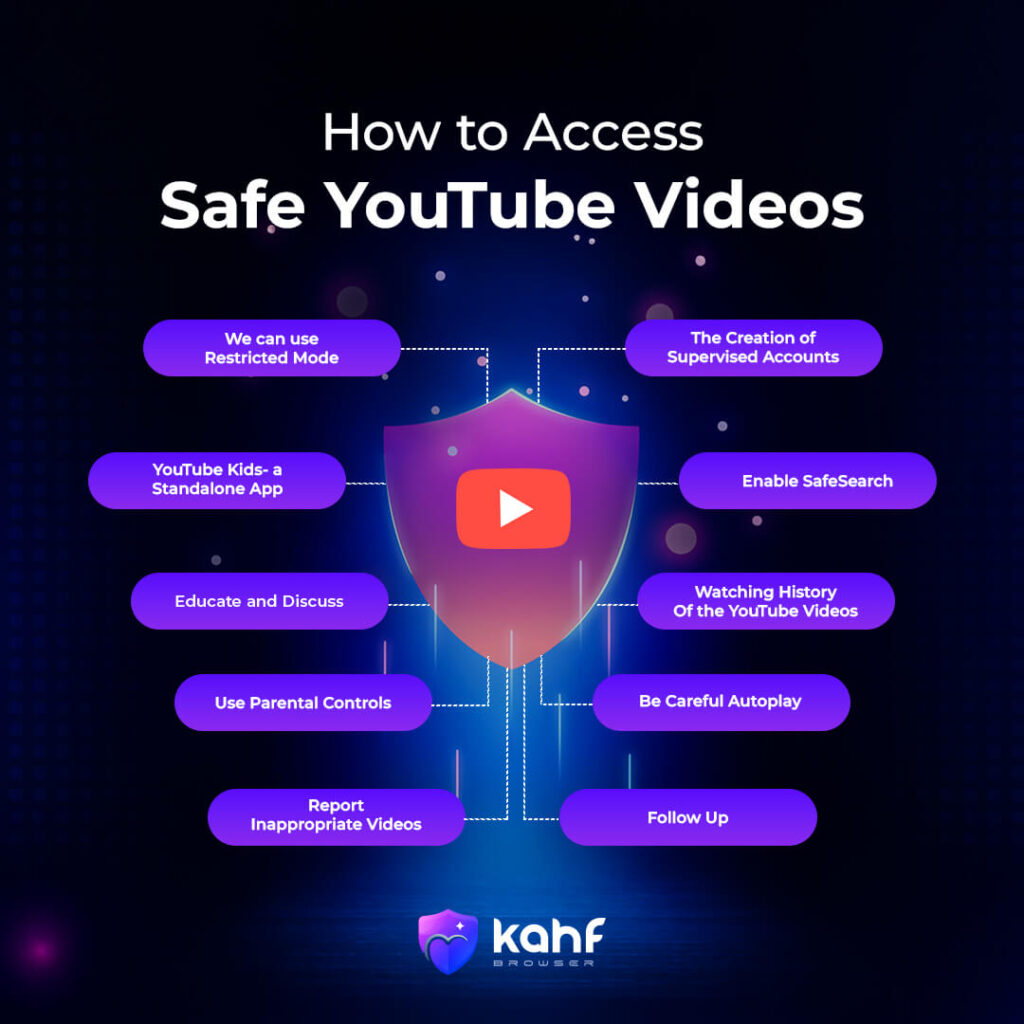
1. We can use Restricted Mode
YouTube’s Restricted Mode uses an inbuilt feature by filtering possibly mature content. Though not unfailing, this is a great tool to further restrict one from being exposed to unsuitable videos. To enable restricted mode:
- Log into your YouTube account.
- Click on your profile icon at the top right.
- Select “Restricted Mode” from the drop-down menu.
- Turn the switch on.
2. The Creation of Supervised Accounts
For younger users, consider supervised accounts through Google Family Link. This gives you control of their activity on YouTube; you can pre-approve content for viewing and place restrictions on viewing time.
3. YouTube Kids- a Standalone App
YouTube Kids is an app designed directly for kids. The app brings together a selection of curated videos suitable for their age, parental controls, and simple interfaces.
4. Enable SafeSearch
SafeSearch is a tool for filtering explicit search results on Google, including YouTube. Enabling SafeSearch can protect kids from landing in sexual abuse settings just by searching.
5. Educate and Discuss
Communicate with children openly about online safety, good digital viewing practices, and online risks. Keep them comfortable in reporting any inappropriate content or situations that make them uncomfortable.
6. Watching History of the YouTube Videos
Ensure that your child’s YouTube history is gone through on a regular basis in order for their preferences to be known and to ensure that no inappropriate videos are being engaged in.
7. Use Parental Controls
Check the options for parental controls on your devices and your internet provider. These can enable you to manage and restrict particular contents, limit usage time, and bar certain sites or applications.
8. Be Careful Autoplay
Autoplay features on YouTube can take users through a spiral of suggested videos, some of which may be inappropriate. You may want to look into turning off autoplay, or at the very least, turn on settings where you can see suggested videos content.
9. Report inappropriate videos
If you see videos that contravene YouTube’s community guidelines, they must be flagged to reduce inappropriate viewing. This can help improve YouTube’s platform for the community.
10. Follow Up
Ensure that you are aware of the most current recommendations for YouTube safety regulations and policies. In this way, you’ll know how to monitor your child in regards to their usage of the app.
Why is Safe Access Important to YouTube?
Although YouTube has become a daily part of life, it has many harmful topics that are very harmful in our personal lives, especially for children. That’s why you need safe access on YouTube. The most important thing is taking preventative actions and openly discussing the importance of negative online activities with the children. Safe browsing on YouTube is considered crucial for a positive and secure online experience, especially for children. Here’s why it’s seen as so important:
Protection from Inappropriate Content
A vast platform with diverse content is represented by YouTube, some of which may be deemed unsuitable for certain age groups. Safe browsing practices are used to help filter out mature, violent, or disturbing videos, providing viewers with a shield from potentially harmful material.
Safeguarding Children
Children are recognized as particularly vulnerable to online risks. They are ensured not to be exposed to inappropriate content, cyberbullying, or online predators through safe YouTube browsing. Their safety can be further enhanced by parental controls and supervised accounts.
Preventing Cyberbullying
A serious issue is represented by cyberbullying, and YouTube can be a platform where it occurs. Cyberbullying incidents can be helped to prevent by safe browsing habits, such as reporting inappropriate comments and blocking malicious users.
Avoiding Misinformation
YouTube hosts a wide array of content, from videos that may contain misinformation or propaganda. Safe browsing encourages critical thinking and fact-checking to help viewers discern credible sources from unreliable ones.
Protecting Privacy
Mindfulness of personal information shared on YouTube is included in safe browsing practices. Potential privacy violations or identity theft are helped to be protected from this.
Ensuring a Positive Experience
Safe searching of the YouTube platform can enhance viewing enjoyment by users curating more educational, fun and family-friendly material.
Encouraging More Responsible Use of the Internet
More responsible use of the platform can be achieved through guided browsing on YouTube and watching over their audience interaction and content consumption.
Being aware of how one can browse YouTube safely makes one take protective measures towards individuals as well as themselves for possible online dangers. Thus, leading to better online engagement.
How to Kahf Browser Safe for YouTube browsing

Kahf Browser’s features ensure that users do not encounter content they deem inappropriate within an Islamic frame. They include Artificial Intelligence algorithms which help filter out explicit, harmful, violent, or other forms of content deemed as haram. This may include videos featuring nudity or sexual activity. Kahf’s “Safe Search” feature ensures that a large amount of search content is filtered, and does not appear for viewing. Kahf Tube serves as a browser extension that has the primary purpose of blocking specific channels and videos that are not suitable for younger audiences.
Continuing with the YouTube safety browsing with Kahf Browser, you can get their extension that filters out negativity specifically from YouTube. The programmers of this extension are fully aware of which channels and videos portray unsuitable content, so rest assured, Kahf Tube will unsubscribe you from them.
Kahf Browser filters YouTube content and utilizes AI algorithms which assist in determining the videos that should not be watched and channels that are heretical to the Islamic faith. The extension is fully equipped with everything you would want for browsing in a safer environment.Kahf Browser prides itself in being one of the few systems capable of both blocking heretical content while allowing informative videos to remain unblocked. Rather than being tagged along for the ride of modern day advertisements that promote immorality, with the extension of Kahf Tube, you now have a choice.
- Maintain up to date Kahf Browser
Always Download the latest version of Kahf Browser so that you can enjoy the most modern filtering technology that the application has to offer.
- Update Kahf Browser Regularly
Make sure the right version of Kahf Browser is installed so one can take advantage of the most recent advancements in filtering and security mechanisms.
- Combine With YouTube’s Functions
Even though Kahf Browser provides additional safeguards, it is prudent to employ Youtube’s safety features such Restricted Mode, and supervised accounts for children.
- Talk to the Children

If the children are using Kahf, informed conversations about digital safety are necessary for the young viewers of Youtube.
With the integration of Kahf Browser’s capabilities and responsible usage, the application of YouTube becomes a more secure and conscious experience. So the suggestion for everyone is to use Kahf Browser to access YouTube videos safely and more securely.